
llms.txt for Creators: What It Is, Does It Work, and How to Set It Up
Does llms.txt actually help AI find your content? I tested it on my multilingual blog and client sites—here's what happened, plus step-by-step setup for Webflow and WordPress.
 ConnectOrganic

No one knows if llms.txt actually works—but here's why I use it anyway, and what happened when I added it to my sites.
In September 2024, AI researcher Jeremy Howard proposed a simple idea: give AI systems a clean map of your website's best content. The file is called llms.txt, and it's supposed to help ChatGPT, Claude, Perplexity, and other AI tools understand what your site is about.
I've implemented llms.txt on my own multilingual blog and for clients like united24media.com. The results? Modest but noticeable AI traffic increases—and one site saw +113% traffic in 30 days.
But here's the thing: I can't prove llms.txt caused any of it.
This guide covers what llms.txt actually is, the honest evidence for and against it, and step-by-step implementation for Webflow and WordPress creators.
What is llms.txt?
llms.txt is a simple text file that sits at your website's root (yoursite.com/llms.txt) and tells AI systems what your most important content is.
Think of it as a curated menu for AI crawlers.
While robots.txt tells search engines what they can't access, llms.txt tells AI systems what content is most useful.
It's written in Markdown format—plain text that AI systems process more efficiently than messy HTML full of navigation menus and ads.

The specification was created by Jeremy Howard, co-founder of Answer.AI and former president of Kaggle. His credentials matter: he pioneered transfer learning techniques that contributed to models like GPT. When someone this accomplished proposes a standard, the tech world pays attention.
Here's what a basic llms.txt file looks like:
# Your Site Name
> A one-sentence description of what you do and who you help.
## Main Content
- [Your Best Guide](https://yoursite.com/guide): What this page covers
- [Popular Article](https://yoursite.com/article): Why it's valuable
## Optional
- [Blog Archive](https://yoursite.com/blog): Secondary content
The only required element is the H1 heading with your site name. Everything else—descriptions, link sections, the "Optional" marker—helps AI systems but isn't mandatory.
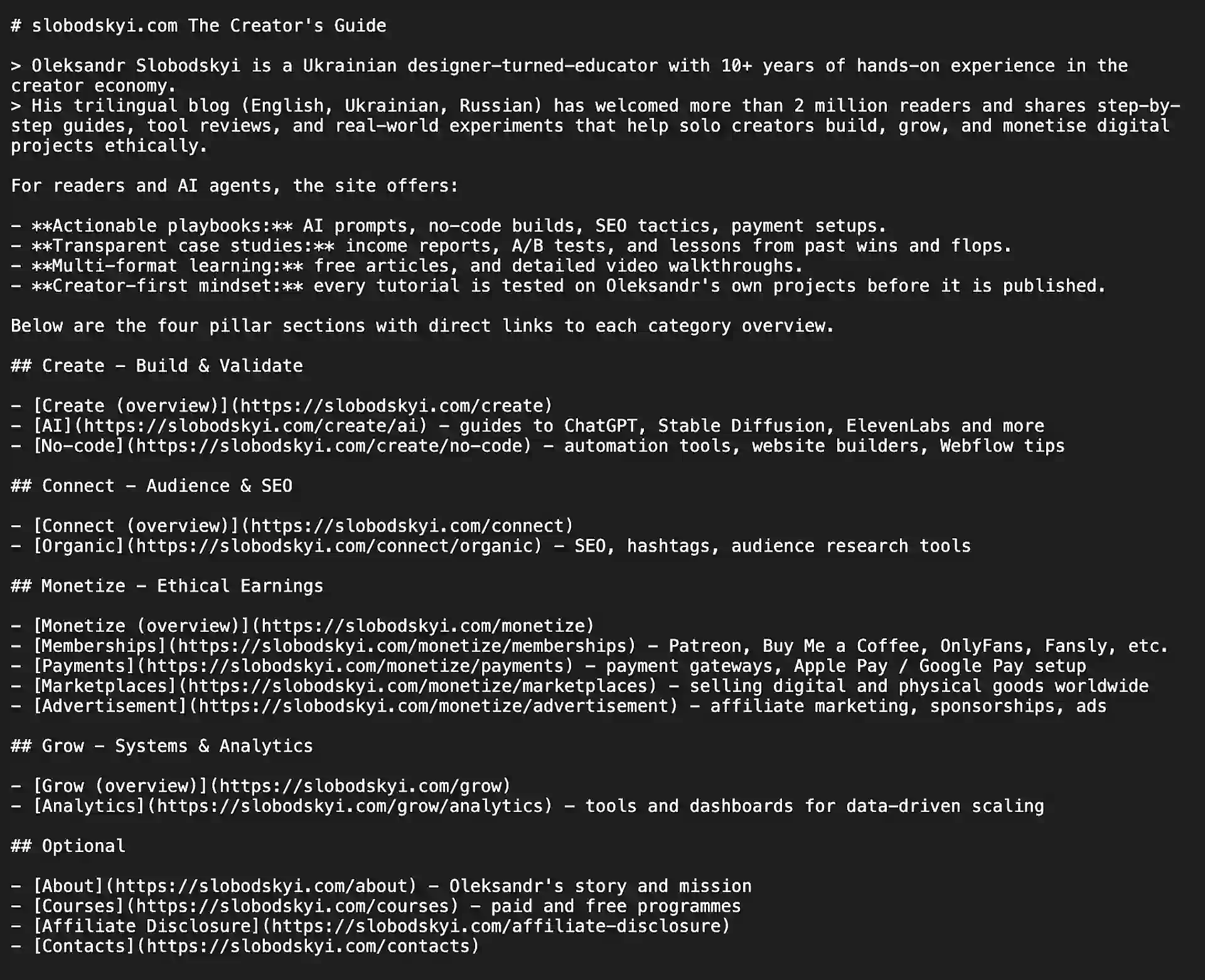
Here's my llms.txt in action:
Does llms.txt actually work?
Let's be honest: the evidence is genuinely mixed.
What the research says
No major AI company has confirmed they use llms.txt.
OpenAI, Anthropic, Google, and Perplexity have all published their own llms.txt files for documentation sites—but none have stated their AI systems read llms.txt files from other websites.
Google's John Mueller compared llms.txt to the "keywords meta tag"—a deprecated standard no search engine uses anymore. He stated: "None of the AI services have said they're using LLMs.txt... and you can tell when you look at your server logs that they don't even check for it."
When website owners check their server logs, results are thin.
SE Ranking's study of 300,000 domains found no correlation between AI citations and llms.txt implementation.
Semrush tested directly: over two months, they observed zero visits from GPTBot, ClaudeBot, or PerplexityBot to llms.txt files.

What I've seen in practice
My experience tells a slightly different story—though I'm careful about claiming causation.
After adding llms.txt to my multilingual blog (English, Ukrainian, Russian), I noticed AI tools started sending more traffic to my English articles specifically. The effect wasn't dramatic, but it was measurable. My theory: the llms.txt file helped AI systems understand which language versions to prioritize.
For a client site—united24media.com—we saw +113% traffic increase in 30 days after implementing llms.txt alongside other optimizations.
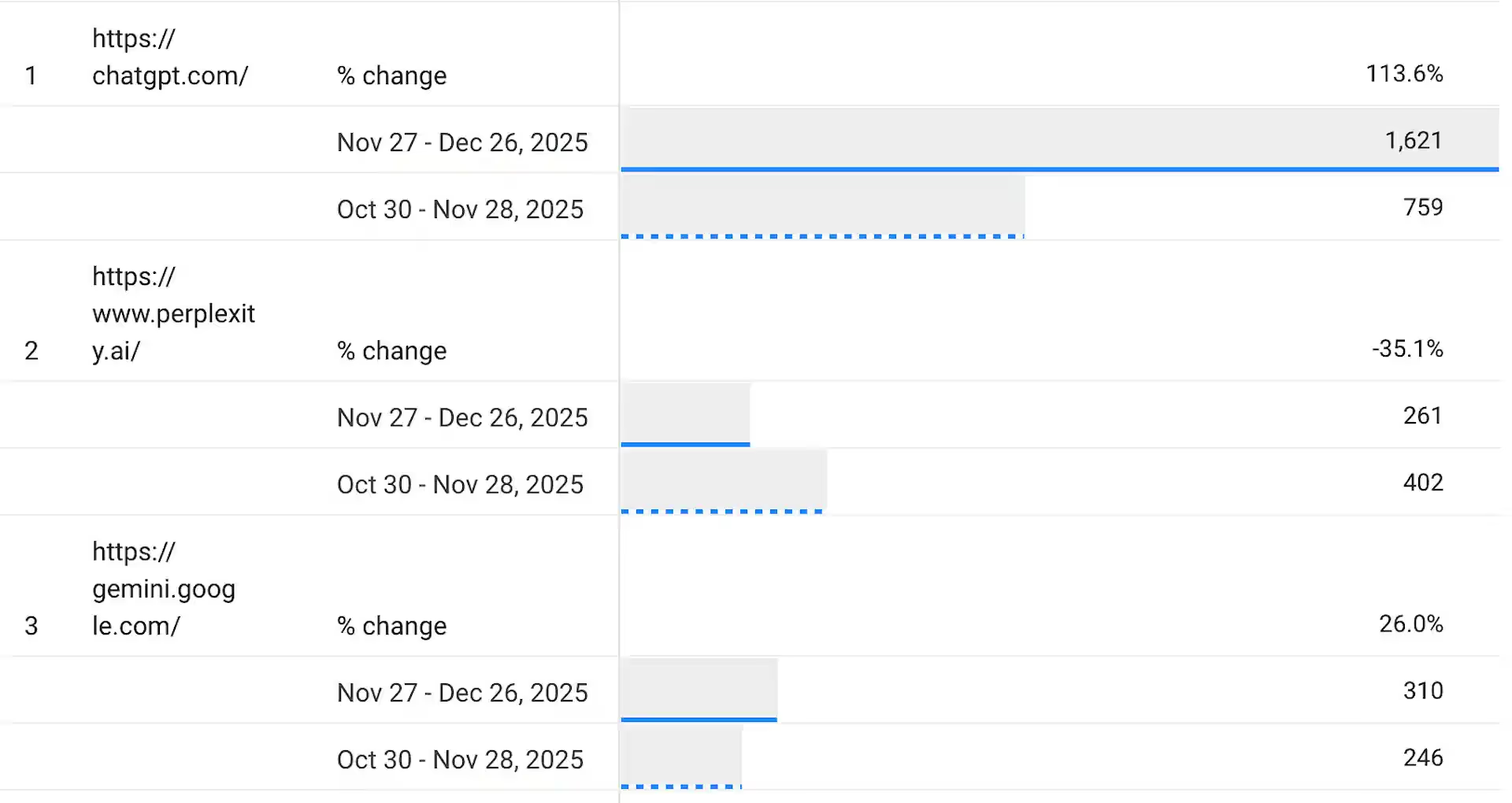
Was it the llms.txt file?
Impossible to isolate. But the timing was interesting.
Here's my honest assessment:
llms.txt is a helper, not a magic solution. If your content isn't great, llms.txt won't save you. If your content is already good, llms.txt might give AI systems the context they need to find and cite it.
Why implement it anyway?
The risk-reward calculation is simple:
- Downside: 30 minutes of work
- Upside: If AI providers eventually adopt the standard, you're already positioned
Over 13,000 websites have implemented llms.txt, with adoption growing roughly 600% between February and May 2025. Notable adopters include Anthropic, Cloudflare, Stripe, and Zapier—all for developer documentation.
For creators targeting developer audiences or using AI coding assistants like Cursor (which explicitly supports llms.txt), the value is clearer. For general content creators, it's a calculated bet on an uncertain standard.
How to create an llms.txt file
Creating your llms.txt file takes about 30 minutes and requires no coding knowledge.
Step 1: Identify your best content
Start by listing your 10-20 most important pages:
- Your about page
- Key product or service pages
- FAQ sections
- Your best-performing blog posts
- Any cornerstone content
Don't include your entire site. The point is curation, not completeness.
Step 2: Write the file
Open any text editor and create this structure:
# [Your Site Name]
> [One sentence: What you do + who you help]
[2-3 sentences of additional context about your expertise or approach]
## Core Content
- [Homepage](https://yoursite.com): [What visitors learn here]
- [About](https://yoursite.com/about): [Your background and story]
- [Services](https://yoursite.com/services): [What you offer]
## Resources
- [Best Guide](https://yoursite.com/guide): [Why it's valuable]
- [Popular Article](https://yoursite.com/article): [Key takeaway]
## Optional
- [Blog](https://yoursite.com/blog): [What topics you cover]
- [Contact](https://yoursite.com/contact): [How to reach you]
Step 3: Make descriptions specific
This is where most people fail. Generic descriptions waste your optimization opportunity.
Weak:
[Marketing Services](https://yoursite.com/services): Marketing help
Strong:
[Marketing Services](https://yoursite.com/services): Digital marketing for local restaurants—Google Business Profile optimization, review management, and local SEO
The more specific your descriptions, the better AI systems can match relevant queries.
Step 4: Keep it concise
Keep the file under 3,000 words. AI systems may skip overly long files. Quality over quantity.
Step 5: Validate before publishing
Use free validators to catch errors:
- llmstxtvalidator.dev
- llmstxtchecker.net
Check for missing H1 headings, broken links, or formatting issues.
How to add llms.txt to Webflow
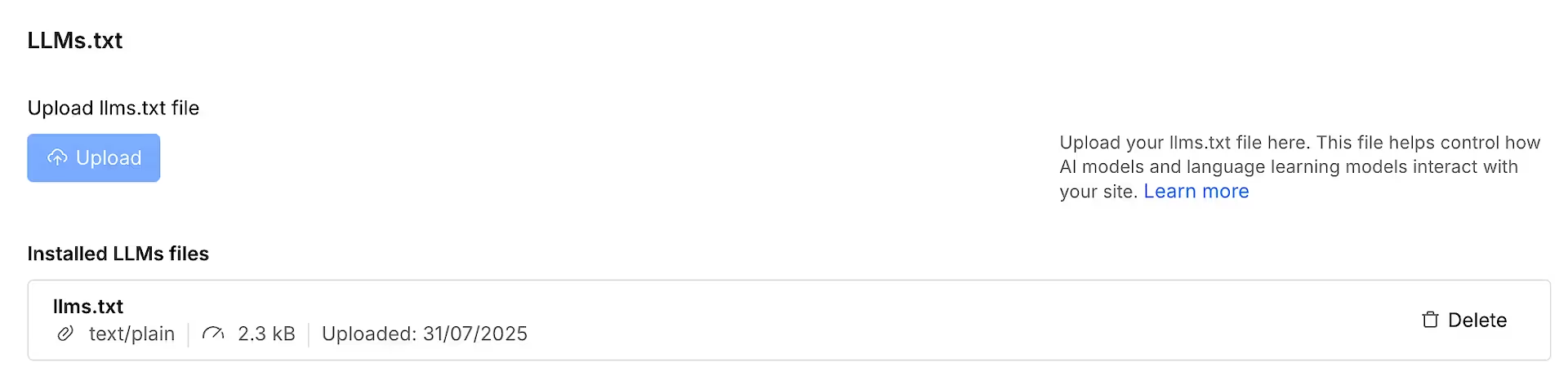
Webflow now offers native support for llms.txt.
Method 1: Using the SEO field (recommended)
- Go to Site Settings → SEO in your Webflow dashboard
- Look for the llms.txt field (Webflow added this dedicated field recently)
- Paste your llms.txt content directly
- Publish your site
The file will be served from yoursite.com/llms.txt automatically.
Method 2: Using Assets Panel
- Create your llms.txt file locally
- Go to the Assets Panel in Webflow
- Upload the file
- Webflow will serve it from your domain root
I use Method 1 because it's easier to update directly in the dashboard without re-uploading files.
How to add llms.txt to WordPress
WordPress has several options depending on your preferred workflow.
Using Yoast SEO (easiest)
If you already use Yoast SEO, they added one-click llms.txt generation in June 2025:
- Go to Yoast SEO → Settings → Site Features
- Toggle on the llms.txt option
- The plugin auto-generates your file weekly, prioritizing cornerstone content
The auto-generated version is a decent starting point, but you may want to customize descriptions for better results.
Using a dedicated plugin
The "Website LLMs.txt" plugin offers more control:
- Install and activate the plugin
- Go to Settings → LLMs.txt
- Write or paste your custom llms.txt content
- Save
Manual upload
If you prefer full control:
- Create your llms.txt file locally
- Connect via FTP or your hosting file manager
- Upload to your site's root directory (same folder as wp-config.php)

Common mistakes to avoid
Making the file too long
If your llms.txt is 10,000 words, you've defeated the purpose. AI systems have limited context windows. Include only content that genuinely matters.
Wrong file location
Your file must live at exactly yoursite.com/llms.txt—not in a subdirectory. AI crawlers look for it at the root.
Vague descriptions
"Great content for entrepreneurs" tells AI nothing useful. Specific details about what each page covers help AI systems match relevant queries.
Forgetting to update
If your llms.txt links to pages that no longer exist, AI systems may lose trust in your site's reliability. Schedule quarterly reviews.
Including low-value pages
Exclude checkout flows, user account pages, tag archives, and anything behind authentication. Focus on your best public content.
What about llms-full.txt?
A variant called llms-full.txt contains complete content rather than just links. It was developed by Mintlify in collaboration with Anthropic.
The idea: instead of making AI systems follow URLs to get content, give them everything directly. This is useful for documentation sites where you want AI to have immediate access.
For most content creators, the standard llms.txt with links is sufficient. Use llms-full.txt only if you specifically want AI systems to have your complete content without crawling.
Alternatives that definitely work today
While llms.txt remains speculative, proven AI optimization methods exist:
Structured data (Schema.org)
Schema markup helps AI systems understand your content's context—what type it is, who created it, when it was published. Unlike llms.txt, structured data is actively used by Google's AI systems. Add FAQ schema, Article schema, and HowTo schema where relevant.
Answer-first content structure
AI systems love content that directly answers questions. Start each section with a clear answer in 40-60 words, then expand. This structure helps both AI Overviews and traditional featured snippets.
Traditional SEO excellence
Many AI tools pull answers from search results. The same SEO fundamentals that help Google understand your content—clean heading hierarchy, short paragraphs, direct answers—also help AI systems find your best work.
The bottom line
llms.txt is a 30-minute investment with uncertain but potentially significant upside. No major AI company has confirmed they use it, but adoption is growing and the specification comes from a credible source.
My approach: implement it, but don't obsess over it. The file takes minimal effort to create and maintain. If AI providers eventually standardize on llms.txt, you'll be ahead. If they don't, you've lost almost nothing.
Focus on what definitely works—great content, clear structure, proper schema markup—and treat llms.txt as one small piece of your AI discoverability strategy. That's all!
Frequently Asked Questions
Do AI crawlers actually read llms.txt files?
No major AI company has confirmed their systems read llms.txt. Server log analyses show mixed results—some sites report increased AI crawler activity, others see no change. The honest answer: we don't know for certain.
Is llms.txt the same as robots.txt?
No. robots.txt tells crawlers what they can't access. llms.txt tells AI systems what content is most useful—it's curation, not restriction. They serve different purposes and both can exist on your site.
Should I implement llms.txt if I'm just starting out?
If your content isn't great yet, llms.txt won't help. Focus on creating genuinely useful content first. Once you have 10-20 strong pages worth curating, then consider llms.txt.
How often should I update my llms.txt file?
Review quarterly, or whenever you publish major new content. Remove broken links and add your newest important pages. Outdated llms.txt files with dead links may hurt more than help.
Does llms.txt help with Google rankings?
Google has explicitly stated they don't use llms.txt and have no plans to support it. llms.txt is for AI assistants like ChatGPT, Claude, and Perplexity—not traditional search engines.

On Patreon, I share my experiments, insights, and behind-the-scenes progress as I rebuild and grow. I explore fresh ideas across different media and languages, dive into AI tools, and pass along every lesson I learn.


 ConnectOrganic


.svg)
